
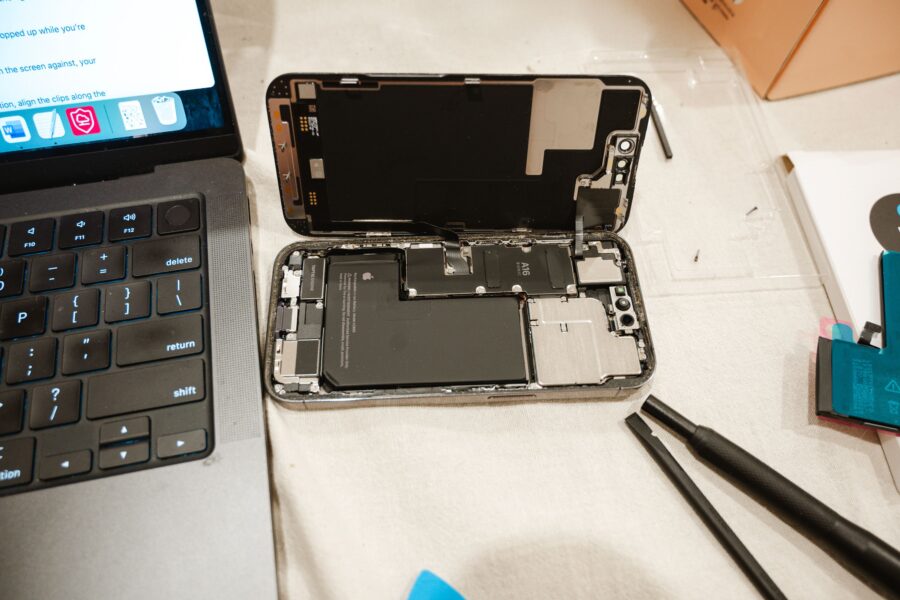
iPhone Battery Health Explained: When Should You Replace Your Battery?

iPhone Battery Health Explained: When Should You Replace Your Battery?
Battery health affects how long an iPhone lasts between charges and how consistently it performs. Because every rechargeable battery ages, even a carefully used iPhone will eventually hold less energy than it did when new.
That does not mean you need to replace the battery as soon as its maximum-capacity figure falls. The percentage is useful, but daily runtime, unexpected shutdowns, charging behaviour, heat, and your own routine provide a more complete picture.
This guide explains how iPhone battery health works, how to interpret the information shown in iOS, and how to decide when a battery replacement makes sense.
What Does iPhone Battery Health Mean?
An iPhone uses a lithium-ion battery. These batteries are compact, rechargeable, and capable of delivering high performance, but their capacity gradually decreases through chemical ageing.
In **Settings → Battery → Battery Health & Charging**, supported iPhones show a Maximum Capacity figure. This compares the battery’s estimated present capacity with its capacity when new. For example, a reading of 90% suggests that the battery can hold roughly nine-tenths of its original charge under comparable conditions.
The figure is an estimate rather than a laboratory measurement. It may remain stable for a while and then change after the system recalibrates its estimate.
Why Battery Capacity Decreases
Battery ageing is influenced by time, charge cycles, temperature, charging patterns, and workload. A charge cycle is completed when cumulative usage equals 100% of the battery’s capacity; it does not have to happen in a single discharge.
Heat is particularly important. Gaming, navigation, video recording, wireless charging, direct sunlight, and charging in a hot environment can raise the device’s temperature. Occasional warmth is normal, but repeated or prolonged exposure to high temperatures can accelerate ageing.
Battery wear is not automatically evidence of a fault. It is an expected characteristic of rechargeable technology.
Is 100% Battery Health Necessary?
No. Maximum Capacity usually begins to decline over time, and an iPhone can work well below 100%. The practical question is whether the phone still meets your needs.
A user who spends most of the day near a charger may be comfortable with less capacity. Someone who travels, relies on navigation, records video, or works away from power may notice the same level of wear much sooner.
Avoid treating a single percentage point as a diagnosis. Observe real-world behaviour across normal days.
What Is Peak Performance Capability?
The Battery Health screen may also provide information about peak performance. As a battery ages, it can become less able to deliver the sudden power demanded by the processor. If voltage drops too far under load, the phone may shut down unexpectedly.
iOS may apply performance management after certain shutdown events to improve stability. Depending on the model and software version, the Battery Health screen can explain whether the battery currently supports normal peak performance or whether service is recommended.
Slower performance can have many causes, including low free storage, background activity, software updates, network conditions, and heat. Battery health should be considered alongside these factors.
Signs That an iPhone Battery May Need Replacement
Consider professional diagnosis or replacement if you experience one or more of these symptoms:
– Runtime has become too short for your normal day
– The iPhone shuts down unexpectedly despite showing charge remaining
– Battery percentage changes abruptly
– Performance is repeatedly limited because of battery condition
– The phone becomes unusually hot during light use or charging
– Charging is inconsistent after the cable and adapter have been ruled out
– iOS displays an important battery message or service recommendation
– The battery is swollen or the display has begun lifting from the frame
A swollen battery requires immediate attention. Stop using and charging the device, avoid pressing the display back into place, and seek qualified service. Damaged lithium-ion batteries should not be punctured or placed in household waste.
At What Battery Health Percentage Should You Replace It?
There is no universal percentage that suits every person. Many people use 80% as a practical reference point, but symptoms and daily requirements matter more than the number alone.
Replacement may be worthwhile above that point if the phone cannot support your routine. Conversely, a phone below it may remain usable for someone with light usage and frequent access to charging.
Think of the percentage as one part of the decision:
1. Does the battery last long enough for your normal day?
2. Is performance stable?
3. Are there shutdowns, heat, swelling, or service warnings?
4. Is the rest of the phone in good condition?
5. How long do you plan to keep it?
If the device still receives the software support you need and works well otherwise, replacing the battery can be significantly less expensive than replacing the entire phone.
How to Check Battery Usage
Open **Settings → Battery** to see which apps and activities have consumed power. Review both the last 24 hours and the longer multi-day view when available.
High usage does not always mean an app is defective. Navigation, video calls, games, camera use, mobile-hotspot activity, weak mobile signal, and background uploads naturally consume more energy. Look for behaviour that does not match your actual use, such as an unfamiliar app remaining active for hours in the background.
Screen brightness and screen-on time are often major contributors. Poor cellular coverage can also increase consumption because the phone works harder to maintain a connection.
How to Make an iPhone Battery Last Longer Each Day
The most effective changes depend on how you use the phone, but these adjustments can help:
– Use automatic brightness or reduce excessive screen brightness
– Enable Low Power Mode when extended runtime matters
– Limit unnecessary background activity and location access
– Use Wi-Fi where practical and secure
– Download media before travelling through weak-signal areas
– Keep iOS and important apps updated
– Review widgets and notifications that wake the screen frequently
– Use Airplane Mode when no usable mobile signal is available and connectivity is unnecessary
Do not disable every useful feature merely to protect the battery. The goal is to remove waste while keeping the phone convenient.
Charging Habits and Long-Term Battery Health
Modern iPhones manage charging automatically, so you do not need to supervise every percentage. Partial charges are acceptable, and routinely draining the battery to zero is unnecessary.
Optimised charging features can reduce the amount of time the battery remains fully charged by learning your routine. Keep these features enabled unless they conflict with a specific schedule.
Use compatible, reputable cables and power adapters. Fast charging is useful, but charging generates heat; make sure the phone can dissipate that heat. Remove an unusually insulating case if the device becomes excessively warm while charging, and avoid placing it under bedding.
Does Wireless Charging Damage the Battery?
Wireless charging is supported by compatible iPhones and is safe when used with suitable equipment. It can produce more heat than an efficient wired connection, especially if alignment is poor.
If the phone repeatedly becomes very warm, check alignment, remove objects between the phone and charger, use certified equipment, and ensure ventilation. Users who prioritise maximum efficiency can choose wired charging, but occasional wireless charging is not by itself a reason for concern.
Should You Charge Overnight?
An iPhone manages charging rather than continuously forcing energy into a full battery. Overnight charging is common and generally convenient. Optimised charging can delay the final portion based on learned routines.
The charging environment matters more than the clock. Use intact, compatible equipment and keep the device on a stable, ventilated surface rather than beneath a pillow or blanket.
Battery Health When Buying a Restored iPhone
When comparing restored iPhones, ask whether the seller sets a minimum battery standard and how battery issues are covered. Two visually identical phones can provide different day-to-day experiences if their batteries have aged differently.
After delivery, verify the Battery Health screen, charge the phone, and test it through a representative day during the return period. Also watch for unexpected shutdowns, excessive heat, and battery messages.
A replaced battery can be positive when the work and component meet appropriate standards. What matters is transparency, correct installation, reliable operation, and warranty protection.
Battery Replacement or New Phone?
A battery replacement is often the better-value option when:
– The phone still receives suitable security and software support
– The display, cameras, buttons, and charging port work correctly
– Storage capacity remains sufficient
– Performance meets your needs apart from battery life
– Repair cost is reasonable relative to the phone’s value
Replacing the entire device may make more sense if several costly components are failing, the phone no longer supports essential software, storage is inadequate, or repair approaches the value of a more suitable replacement.
Preparing an iPhone for Battery Service
Before handing over your device, back it up and follow the service provider’s instructions. You may need to disable Find My, remove payment cards or transport passes, and know your device passcode. Do not disclose account passwords unnecessarily.
After service, check charging, battery information, buttons, cameras, speakers, microphones, connectivity, and display seating before leaving or as soon as the phone is returned.
Frequently Asked Questions
Why did battery health drop suddenly?
The displayed figure is an estimate and can change when the system recalibrates. A change does not necessarily mean that the battery lost that capacity overnight.
Does closing apps improve battery life?
Constantly force-closing ordinary apps is generally unnecessary and can sometimes cause more work when they reopen. Investigate apps showing abnormal background activity instead.
Is Low Power Mode safe to use every day?
Yes. It reduces or delays certain activities to conserve energy. Some updates, visual effects, and background processes may be limited while it is enabled.
Can software updates affect battery life?
Temporary additional activity can occur after an update while the phone indexes content and completes background tasks. Persistent drain should be investigated through Battery settings and normal troubleshooting.
Will a new battery make an old iPhone faster?
It can improve consistency if the aged battery was unable to support peak performance. It will not change the processor, storage capacity, camera hardware, or software-support status.
Conclusion
iPhone battery health is most useful when combined with real-world observation. Maximum Capacity helps describe ageing, but runtime, reliability, temperature, performance, and your daily needs determine when action is necessary.
Good charging habits and heat management can support long-term health, but no rechargeable battery lasts forever. If the phone remains suitable in every other respect, professional battery replacement can extend its useful life and restore much of its everyday convenience.